
Epson DTF Transfers: Complete Setup Guide for Professional Results
Eazy DTFEpson printers have emerged as a powerful solution for DTF (Direct to Film) transfers, offering precision and reliability that many crafters and small businesses trust. While Epson may not be the first brand you associate with custom apparel printing, these printers deliver exceptional results when properly configured for DTF applications.
Whether you're just starting with DTF printing or looking to upgrade your current setup, understanding how to optimize your Epson printer can transform your transfer quality and business efficiency. The key lies in proper white ink installation, correct printer settings, and mastering the complete DTF transfer process.
Key Takeaways
- Epson EcoTank printers excel at DTF transfers due to their precision, detail capabilities, and cost-effective ink systems
- Proper setup requires white ink cartridge installation and specific printer settings adjustments
- The DTF transfer process involves printing mirrored designs, applying adhesive powder, and heat pressing onto garments
- Common issues stem from incorrect temperature settings, uneven powder application, and improper fabric preparation
Understanding DTF Transfer Technology for Epson Printers
DTF transfer technology represents a significant advancement in custom apparel printing, particularly when paired with Epson's piezoelectric printhead technology. The process involves printing your design onto a special PET film, applying thermoplastic adhesive powder, and then transferring the complete design onto fabric using heat and pressure.
Unlike other transfer methods, DTF works on virtually any fabric type and color without requiring pretreatment or fabric preparation. The adhesive powder bonds the ink to the fabric during the heat press process, creating transfers that maintain flexibility and washability even after repeated laundering.
Epson printers excel in DTF applications because their ink droplet precision creates sharp details and smooth color gradients. The white ink capability, when properly installed, enables vibrant colors on dark fabrics. This capability makes DTF particularly valuable for custom DTF transfers that need to pop on any garment color.
Why Epson DTF Printing Dominates Custom Apparel Industries
DTF printing with Epson printers has become essential across multiple industries due to its unique combination of quality, versatility, and cost efficiency. Fashion brands rely on Epson DTF setups for producing limited edition designs and prototype testing without the high setup costs of traditional screen printing.
Sports teams and athletic organizations choose Epson DTF solutions for custom jerseys and fan merchandise that must withstand frequent washing and wear. The transfers maintain their integrity through dozens of wash cycles, making them ideal for athletic applications where durability matters.
The promotional products industry particularly values Epson DTF's ability to produce small batch runs cost-effectively. Whether creating corporate branded apparel or event-specific merchandise, modified Epson printers deliver consistent results without minimum order requirements.
Event planners and party organizers appreciate the quick turnaround times possible with Epson DTF setups. DTF transfers for parties can be designed, printed, and applied within hours, making last-minute customization possible. This flexibility has made Epson-based DTF printing the go-to solution for businesses requiring responsive, high-quality custom apparel production.
Why Choose Epson Printers for DTF Transfer Production

Epson printers, particularly the EcoTank series, offer several distinct advantages for DTF transfer production. Their piezoelectric printhead technology delivers precise ink droplet placement, resulting in sharp details and smooth color gradients essential for professional-quality transfers that compete with commercial printing services.
The EcoTank system's refillable ink tanks significantly reduce operating costs compared to traditional cartridge-based systems. This cost efficiency becomes crucial when producing high volumes of transfers or running a DTF printing business where profit margins directly impact sustainability and growth potential.
Epson's print driver software provides extensive color management options, allowing fine-tuning of color profiles specifically for DTF applications. This control ensures consistent color reproduction across different batches and fabric types, maintaining brand standards and customer expectations.
Most importantly, many Epson models can be successfully modified to accommodate white ink cartridges. White ink capability is essential for DTF transfers, as it serves as an underlayer that makes colors vibrant on dark fabrics and provides the opacity needed for professional-quality transfers that rival screen printing results.
Epson DTF Printer Setup: Essential Configuration Steps
Preparing your Epson printer for DTF transfer production requires several critical steps to ensure optimal performance and print quality. Start by verifying your specific Epson model's compatibility with DTF modifications, as models like the ET-2720, ET-2760, and ET-4700 series are particularly well-suited for conversion.
The white ink installation process typically involves replacing the light cyan and light magenta cartridges with white ink cartridges. This modification may require specific conversion kits designed for your printer model. Research reputable suppliers who offer complete conversion kits with detailed installation instructions and ongoing technical support.
Once white ink is installed, configure your printer settings for DTF media compatibility. Select "Premium Glossy Photo Paper" or similar high-quality photo paper settings in your print driver. This setting ensures proper ink density and droplet placement on DTF film for optimal transfer quality.
Essential Epson DTF configuration steps include:
- Install white ink cartridges according to manufacturer specifications and printer model requirements
- Load DTF film with the printable side facing the correct direction (usually printable side down)
- Adjust print quality to highest settings for optimal detail reproduction and color accuracy
- Configure color management for DTF-specific color profiles to ensure consistent results
- Run alignment and nozzle check tests to ensure all colors, including white ink, print correctly
- Install DTF-specific RIP software if using professional workflows
Test your setup with a small sample design before committing to larger projects. This testing phase helps identify any adjustment needs and ensures your DTF transfers will meet quality expectations and customer requirements consistently.
Complete Epson DTF Transfer Process: Step-by-Step Guide
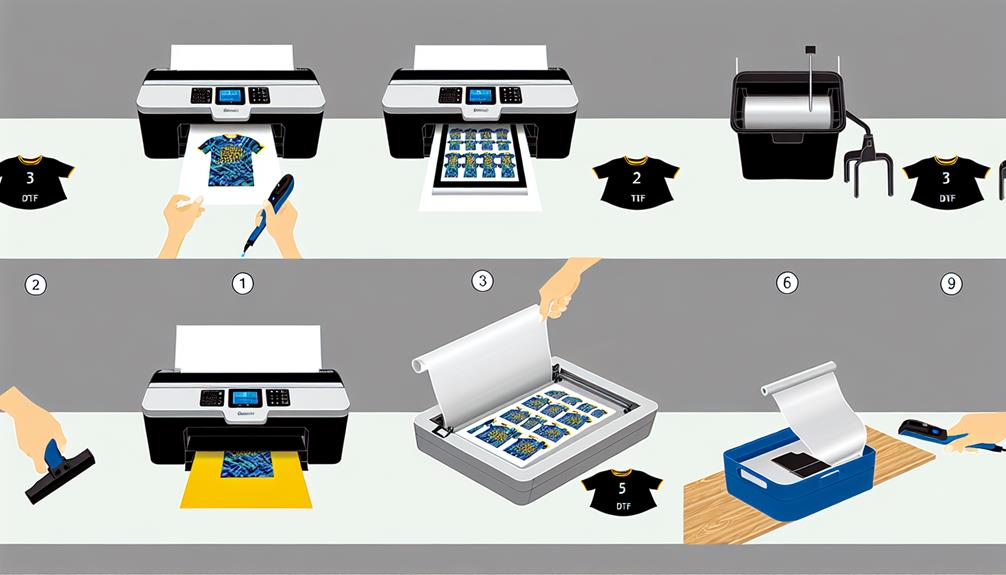
The DTF transfer process with Epson printers follows a precise sequence that ensures professional results and customer satisfaction. Begin by preparing your design file, ensuring all text and directional elements are mirrored horizontally. This mirroring step is crucial because the design transfers in reverse during heat press application.
Print your design onto DTF film using the configured Epson printer settings. The printer will first lay down the colored inks, followed by the white ink underlayer. This white layer provides opacity and color vibrancy on dark fabrics while ensuring the design appears correctly when transferred.
Immediately after printing, while the ink remains wet and tacky, apply DTF adhesive powder evenly across the entire printed area. Use a powder shaker or fine mesh sieve for consistent coverage. The powder adheres to the wet ink and forms the bonding agent between the transfer and fabric during heat application.
Cure the printed and powdered transfer using a heat source such as a curing oven, heat gun, or conveyor dryer. Proper curing melts the powder and creates a stable transfer ready for application. The transfer should feel dry and slightly tacky when properly cured, indicating successful powder activation.
Finally, position the cured transfer on your garment and apply using a heat press at approximately 300-320°F for 10-15 seconds with medium pressure. Allow the transfer to cool completely before removing the carrier film to reveal your finished design. Proper cooling ensures the adhesive sets correctly and prevents transfer damage.
Troubleshooting Common Epson DTF Transfer Issues
Even with proper setup, Epson DTF printing can present challenges that affect transfer quality and production efficiency. Understanding these common issues and their solutions helps maintain consistent production quality and reduces material waste that impacts profitability.
Powder adhesion problems often result from insufficient ink coverage, incorrect powder application timing, or using incompatible powder types. Ensure your design has adequate ink density, particularly in solid color areas. Apply powder while ink remains wet, typically within 30-60 seconds of printing completion for optimal adhesion.
Color inconsistency issues may stem from clogged print nozzles, incorrect color profiles, or inconsistent white ink flow. Run regular nozzle checks and cleaning cycles to maintain print head health and prevent costly reprints. Use DTF-specific color profiles rather than generic photo paper settings for accurate color reproduction.
Transfer durability problems usually relate to incorrect heat press parameters, insufficient curing, or incompatible fabric types. Verify your heat press temperature using an infrared thermometer, and ensure consistent pressure across the entire transfer area. Under-cured transfers may appear glossy and fail to bond properly with fabric.
Key troubleshooting strategies for Epson DTF success include:
- Monitor powder application thickness for consistent coverage without excess buildup that causes texture issues
- Maintain proper heat press temperature between 300-320°F for optimal bonding without fabric damage
- Test different fabric types to understand how DTF performs on various materials and blends
- Keep detailed records of successful settings for future reference and consistency
- Perform regular maintenance on white ink systems to prevent clogs and color shifts
- Join online DTF communities for peer support and troubleshooting advice from experienced users
For complex issues or business-critical production needs, consider investing in DTF sample packs to test different approaches and identify optimal settings for your specific requirements and customer expectations.
Maximizing Your Epson DTF Business Success
Successfully operating a DTF printing business with Epson printers requires understanding both the technical aspects and market opportunities that leverage DTF's unique advantages. Focus on niche markets where DTF's capabilities shine, such as small batch custom orders, intricate multi-color designs, or quick-turnaround projects that competitors struggle to fulfill profitably.
Consider offering specialized services like DTF transfers for sports teams or DTF transfers for small businesses to differentiate your services and command premium pricing. These markets value quality and customization over low prices, making them ideal for Epson DTF operations.
Maintain equipment properly by performing regular maintenance cycles, using quality inks and films, and keeping detailed production records. This attention to detail ensures consistent quality that builds customer trust and repeat business while maximizing the lifespan of your Epson printer investment.
Scale your operations gradually by investing profits back into additional Epson printers or upgraded models. This approach allows steady growth without overwhelming debt while building expertise across multiple printer configurations for increased production capacity and redundancy.
Frequently Asked Questions
Can You Use an Epson Printer for DTF Transfers?
Yes, many Epson printers work excellently for DTF transfers after proper modification. Epson EcoTank models are particularly popular due to their cost-effective ink systems and modification-friendly design. You'll need to install white ink cartridges and adjust printer settings for DTF film compatibility. The piezoelectric printhead technology in Epson printers delivers the precision required for high-quality DTF transfers that rival commercial printing services.
What Modifications Are Required for Epson DTF Printing?
Epson DTF modifications typically involve installing white ink cartridges in place of light cyan and light magenta cartridges, as these colors are least critical for most designs. You'll also need DTF-specific printer drivers or RIP software that supports white ink management and proper color layering. Some users add external ink tanks for continuous operation and reduced ink costs. These modifications void the printer warranty but significantly expand DTF printing capabilities.
How Much Does It Cost to Convert an Epson Printer for DTF?
Converting an Epson printer for DTF typically costs between $200-500, depending on your specific model and chosen conversion kit quality. This includes white ink cartridges, modification hardware, and any necessary software licenses. While this represents a significant upfront investment, it's much more affordable than purchasing dedicated DTF printers that can cost $3,000-$10,000 or more for commercial-grade units.
What DTF Film Works Best with Epson Printers?
High-quality PET DTF films with excellent ink absorption work best with Epson printers and water-based DTF inks. Look for films specifically designed for piezoelectric printers, as they're formulated to work optimally with Epson's printhead technology. The film thickness should be around 75 microns for optimal handling and transfer quality. Avoid films designed for toner-based systems, as they may not provide proper ink adhesion or color vibrancy.
Can I Print DTF Transfers at Home with an Epson Printer?
Absolutely! Home DTF printing with Epson printers is increasingly popular among crafters and small business owners seeking professional results without commercial equipment costs. You'll need the modified printer, DTF film, adhesive powder, and a heat press for complete production capability. Start with simple designs to master the process before attempting complex multi-color transfers. Custom DTF transfers from home can be both rewarding and profitable with proper technique and quality equipment.